

How a product recommendation chatbot should answer "which one fits me?": suggest from your catalog with a reason, show the trade-off, and compare.
A good product recommendation chatbot answers "which one fits me?" the way a good shop assistant would: it asks what the shopper needs, suggests one or two products from your catalog with the reason each fits, mentions the cheaper option when it is enough, and lets the shopper compare. This guide shows how to set that up and what to check before you trust it with real shoppers.
Why "which one fits me?" loses sales
Products that need explaining get questions before the order: room size, compatibility, skin type, capacity, warranty. The specs are on the product pages, but shoppers cannot match them to their own situation, so they open ten tabs or ask somewhere else. When nobody answers at night, many of them buy elsewhere.
A chatbot that only repeats the product description does not help. The shopper needs a decision, based on what they said.
What a good answer looks like
Take a shopper who writes: "I need a quiet purifier for a 30 m² bedroom."
A useful answer:
- Suggests one or two products, not twenty, and marks the best match.
- Says why each fits this shopper: "Sized for your 30 m² bedroom. The quietest at night."
- Names the trade-off: "Filters cost a little more than the smaller model."
- Shows what the shopper needs to act: photo, price and sale price, stock, a link to the product page.
- Offers a comparison if two options are close.
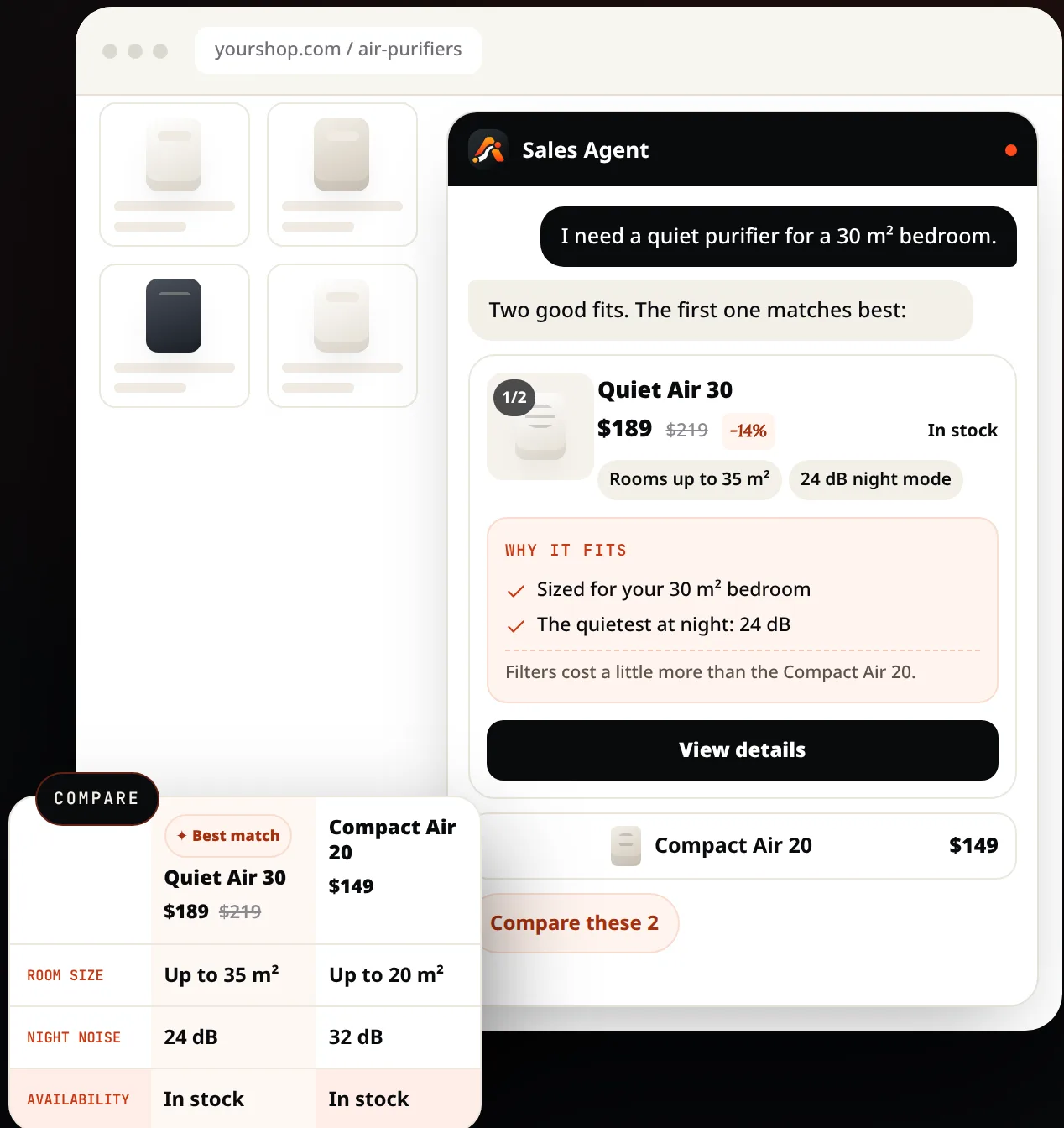
In AgentGuide, the Sales Agent answers with product cards built from your catalog: photo, price and sale price, stock as of your last catalog import, up to three key details, the reasons it fits this shopper, a trade-off when there is one, and View details, which opens your product page.
Honest beats pushy
The fastest way to lose a shopper's trust is to recommend the most expensive item every time. A recommendation agent should:
- Mention the cheaper option when it is enough. "The C1 costs less if you do not need the quiet motor."
- Say when something is out of stock instead of hiding it.
- Admit what it does not know. If your catalog does not say whether a product fits a certain use, the agent should say so and offer to have your team answer, not guess.
Your shoppers come back when the advice was right, not when it was expensive.
Compare, differences first
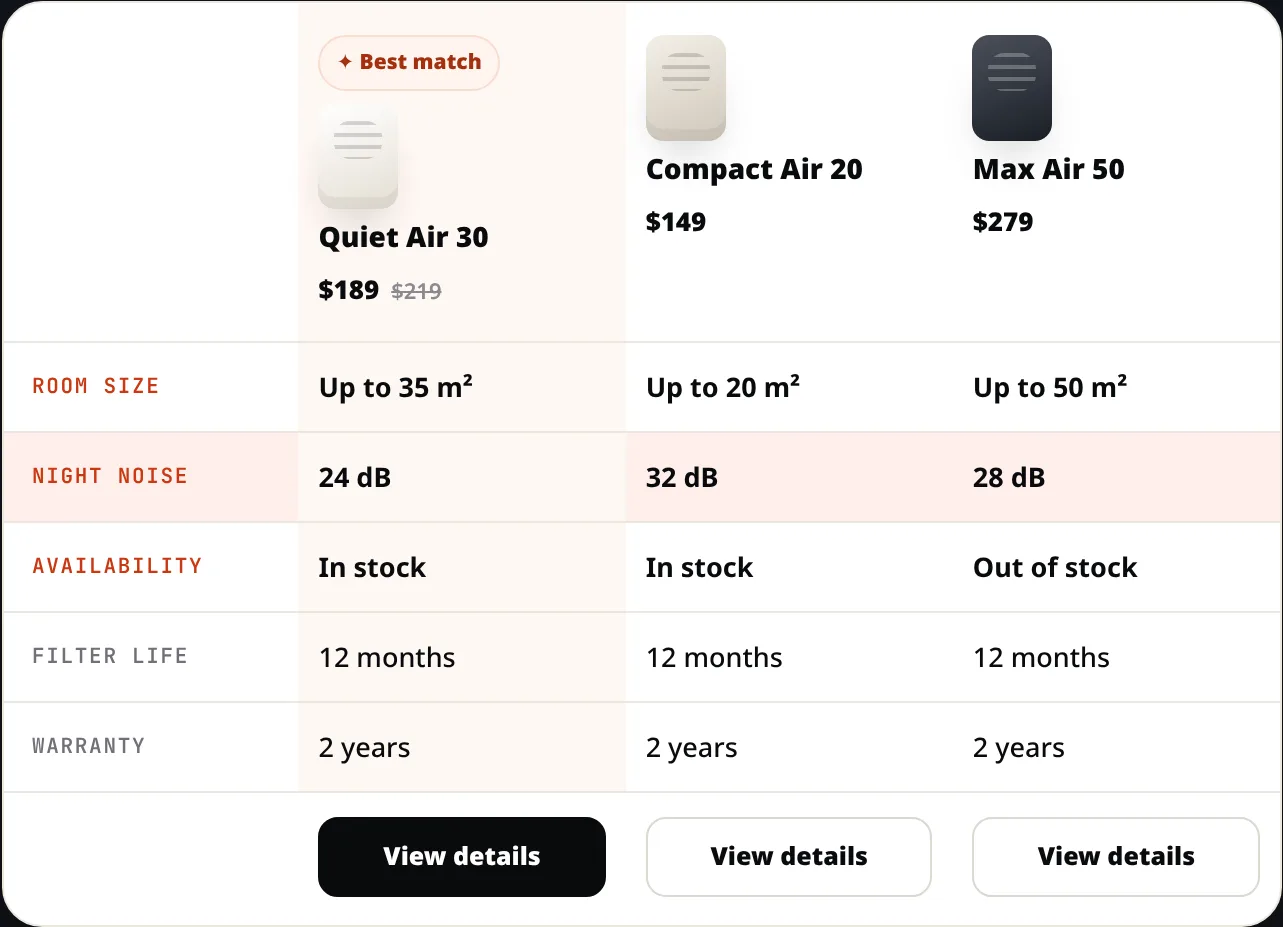
When two products look alike, shoppers ask "what's the difference?". The Sales Agent can line up two to four products from your catalog side by side, with the differences listed first, the best fit marked when one clearly fits, and every value taken from your catalog rather than guessed.
Set it up in four steps
1. Add your catalog
In Knowledge → Add knowledge, choose one of:
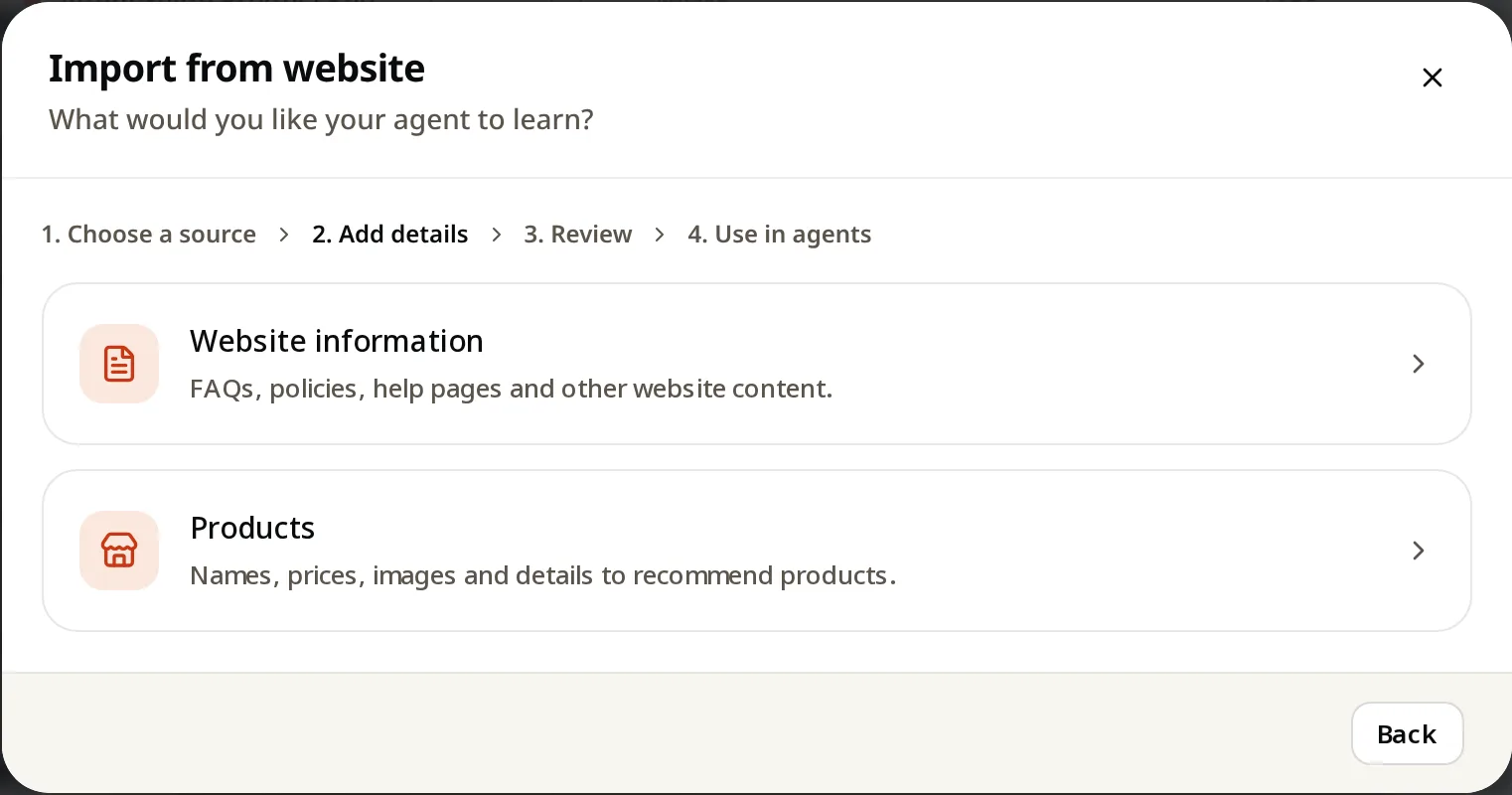
- Import from website → Products to read products from your shop pages.
- Upload files with a product list as CSV or JSON.
- Add manually → Add a product for a handful of items: name, price, image and purchase link.
Catalog limits run from 200 products on Free to 5,000 on Growth and 50,000 on Pro.
2. Add the details shoppers decide on
Recommendations are only as good as your data. For each product, make sure the facts shoppers ask about are in the catalog or in a short buying guide: sizes, compatibility, who it is for, what is included, warranty. Add your delivery, returns and payment policies as knowledge too.
3. Create a Sales Agent
In Agents → Create agent, choose Sales, select your product knowledge, and set the next steps:
- Open a link to your product or checkout pages.
- Call or message directly by phone, WhatsApp, Zalo or email.
- Contact form for quote requests and questions your catalog cannot answer.
Add questions to start a chat on category pages, such as "Which one is right for my room?", so shoppers start with one tap.
4. Test with real shopper questions
Use Test agent (test chats are not counted) and ask the questions your shop actually gets:
- "Which one for a small room?"
- "What's the difference between these two?"
- "Is the cheaper one enough for me?"
- A question your catalog does not answer. The right result is an honest "I don't have that information" and your contact option.
Re-import your catalog when prices or stock change, so cards stay accurate.
What it is not
- Not a replacement for your product pages. The agent links to them for the purchase.
- Not a live inventory feed. Stock is as of your last catalog import.
- Not a discount engine. It shows sale prices that are in your catalog and does not invent offers.
Summary
- Answer "which one fits me?" with one or two suggestions, each with a reason and a trade-off.
- Show cards shoppers can act on: photo, price, stock, details, a link.
- Recommend the cheaper option when it is enough; it builds trust.
- Compare side by side with differences first, using only catalog values.
- Keep the catalog complete and up to date; that is where accuracy comes from.
Read the full setup for plans and services in How to set up an AI sales agent, see AgentGuide for online shops, or start free with no credit card.